eCalendar - Daily Planner
Shenzhen Fujia Technology Co., Ltd.Photography
4.7651.00 Reviews
- Version
- 1.47.2
- Installs
- 100.00K
- Age Rating
- Everyone
Screenshots
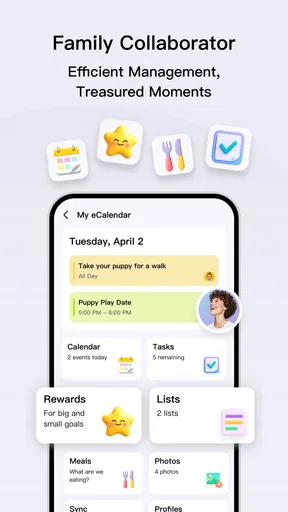
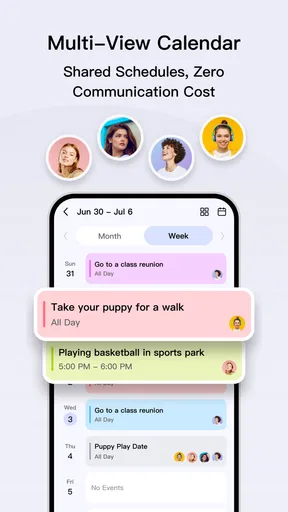
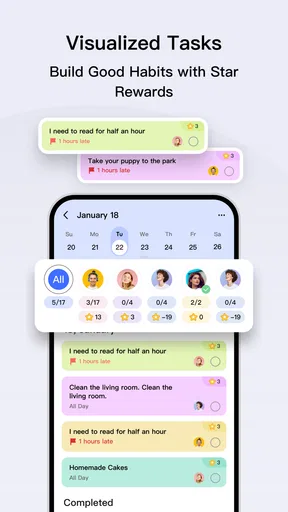
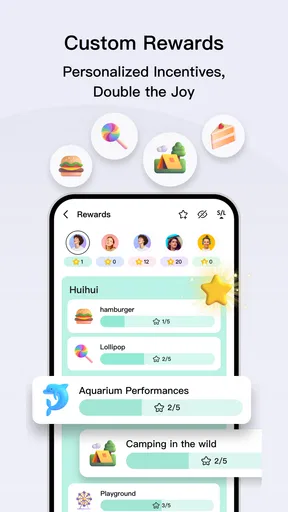
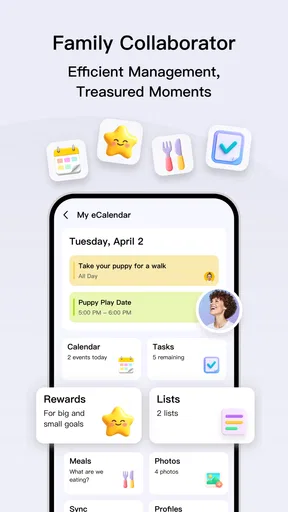
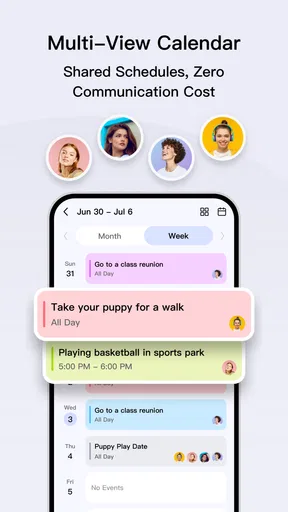
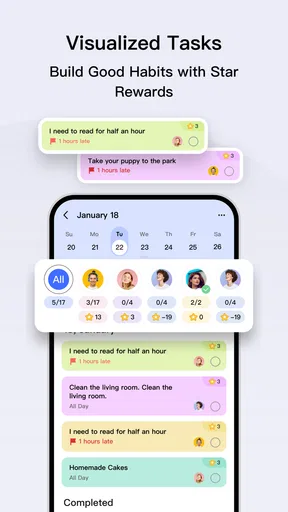
Our Review of eCalendar - Daily Planner
 Analysis by Appyee
I usually judge a calendar by one simple question: does it help me decide what to do next without becoming another task to manage? That is the appeal of eCalendar. It is a free photography-category app from Shenzhen Fujia Technology Co., Ltd., but its practical role is much more familiar: a focused daily planner for people who want a clear place to check dates and organize everyday plans.
After using it, I see the app as a deliberately uncomplicated option rather than a replacement for every calendar service. It is aimed at someone who values a clean, direct planning routine over a crowded workspace filled with project tools, social features, or complicated scheduling systems. The store presents it as simple, easy to use, focused, and efficient, and that description matches the way I approached it: open the app, look at the day, and make a decision.
How I would decide whether eCalendar belongs on my phone
The first thing I would consider is how much structure I actually need. If your calendar is mainly a visual reminder for appointments, errands, study sessions, family plans, or personal routines, a lightweight planner can be more comfortable than a feature-heavy alternative. You do not have to think about projects, collaboration spaces, or elaborate workflows before writing down a plan.
The second question is whether you want a calendar that stays in the background. Many people do not need their planner to become a second inbox. They need to see a date, understand what is happening, and move on. That is where this app makes sense. Its identity is not built around turning every activity into a detailed productivity system. I found that restraint useful when I only wanted to organize the day rather than redesign my entire routine.
There is also a practical compatibility point. The app runs on Android 7.0 and later, which makes it accessible on a broad range of Android phones, including devices that are not running the newest software. Its current version is 1.47.2, and the application is free to install. The content rating is Everyone, so it is suitable for a general audience rather than being aimed at a narrow age group.
Trust is another part of the decision. The app has a 4.7 average from around 5K ratings, with over 600 written reviews, and it has passed 100K+ installs. Those figures do not prove that it will suit every planning style, but they do suggest that the straightforward approach is connecting with a meaningful group of users. I would still choose based on workflow, not popularity alone.
The kind of planning routine that suits it
I think of eCalendar as most useful for date-centered planning. That means looking at a particular day or period and recording what matters there. It can fit a student checking classes and deadlines, a parent keeping track of school-related commitments, or a worker who wants a personal view of appointments and errands.
A realistic everyday example would be a busy weekday with three unrelated obligations: a morning appointment, a grocery stop after work, and an evening call. Instead of holding those details in separate notes or trying to remember them from messages, I would place them into one daily view. The benefit is not advanced automation; it is the reduction of small memory tasks. I can check the plan before leaving home and again when the day changes direction.
For that scenario, I would use short, recognizable wording rather than writing full explanations. “Dentist,” “groceries,” and “call Mum” are faster to scan than long entries. This is one of the less obvious ways to get more from a simple planner: the quality of the calendar view depends on how quickly your eyes can interpret it. The app works best when I treat it as a visual decision aid, not as a diary.
Where the focused design wins
The strongest advantage is the low mental overhead. A complicated calendar can make a small plan feel like an administrative project. With a focused app, I can keep the act of planning separate from the rest of my digital life. That matters when I am tired, in a hurry, or only need to record one thing.
I also like the possibility of using it as a personal planning layer. Some people already have calendars connected to work or school accounts but do not want every private errand mixed into those spaces. A dedicated daily planner can keep personal intentions separate from formal commitments. I would use it for household tasks, quiet study blocks, shopping reminders, or a rough outline of a weekend.
Another useful trade-off is that simplicity can make the app easier to hand to someone else. If a family member is uncomfortable with complicated productivity software, a plain calendar concept is easier to explain. You can show the basic habit—open the date, read the plan, add what matters—without teaching a whole system of tags, boards, databases, and workflows.
The real strength is not doing more; it is making the next check-in feel easy. That distinction is important. People often abandon planning tools because maintaining them takes nearly as much effort as the activities they are meant to organize. A modest daily routine is more likely to survive if the app does not demand constant configuration.
Small habits that make the app more useful
I would begin with a weekly reset rather than adding entries randomly throughout the day. At the start of the week, I would review fixed commitments first, then add flexible tasks around them. This prevents the common mistake of treating every item as equally urgent. A calendar is more helpful when it shows the shape of the week, not just a pile of intentions.
My second tip is to separate appointments from tasks through wording. An appointment has a time and a place; a task has an outcome. Even if both live in the same planner, writing “pick up prescription” instead of “pharmacy” makes the action clearer. This is a small workflow improvement, but it reduces the chance that I will read an entry and still wonder what I meant.
I would also avoid filling every open space. A day that looks perfectly packed may be satisfying when planned, but it leaves no room for delays, travel, or ordinary interruptions. The app is most effective when I use it to protect important commitments and identify a few priorities, rather than pretending that every minute can be controlled.
For recurring personal routines, I would keep the entry language consistent. If I write “exercise,” “workout,” and “gym” for the same kind of activity, the calendar becomes harder to scan over time. A stable vocabulary makes patterns easier to notice and gives the planner a more reliable role in my routine.
Where other calendar categories may fit better
The same simplicity that makes eCalendar approachable can become a limitation for users who need a connected scheduling system. If your day depends on shared work calendars, invitations, team availability, or automatic synchronization across several services, I would first look at the calendar already built into your work or school setup. A platform-specific option may handle those relationships more naturally.
People managing complex projects may also prefer a task manager or project board. A calendar can show when something should happen, but it is not automatically the best place to break a large assignment into stages, track ownership, attach extensive reference material, or monitor progress. For a renovation, a product launch, or a group event, a specialized tool may be a better fit even if you keep this app for personal dates.
Users who want a journal-like experience should be equally selective. A daily planner can help answer “what is scheduled?” but it is not the same as recording how the day felt, preserving long reflections, or building a searchable personal archive. I would not choose it as my main writing space if the purpose of planning is emotional tracking or detailed memory keeping.
There is a similar distinction with reminder-focused apps. If you regularly forget tasks unless the phone actively prompts you at a particular moment, a reminder system may be more suitable. A calendar view encourages me to check the plan, while a reminder is designed to interrupt me. Neither approach is universally better; the right choice depends on whether your problem is seeing the day or being alerted before something happens.
That comparison also explains who should skip eCalendar. I would look elsewhere if I needed a highly integrated professional schedule, extensive collaboration, sophisticated task dependencies, or a strong notification-centered workflow. I would also skip it if I enjoy customizing every part of a productivity system and expect a calendar to act as a full command center. This app’s value comes from staying focused, so demanding that it behave like a different category will only create frustration.
What switching to it really involves
Moving to a new planner is not just an installation decision. The real cost is rebuilding the habit and deciding which information deserves to move. I would not copy every old note immediately. I would start with future commitments and the few routines I genuinely review. That keeps the transition manageable and lets me test whether the app supports my actual behavior rather than an idealized version of it.
My recommended switch would happen at the beginning of a week or month, when it is easier to establish a clean boundary. I would keep the old calendar available for reference, transfer only essential upcoming items, and spend several days checking the new planner at the same time each morning. This reveals whether the app fits naturally into my routine or whether I am only enjoying the novelty of a fresh setup.
There is also a data-entry trade-off. A simple calendar may be quicker for basic plans, but users with years of detailed history may value the search, account connections, or migration tools of a larger platform. Before switching permanently, I would consider whether old events are important for reference. If they are, keeping an archive elsewhere may be more sensible than trying to force every past detail into a new daily workflow.
Because the app is free, the financial barrier is low. The more important investment is attention: remembering to open it, using consistent wording, and reviewing the plan before the day becomes busy. Free does not mean effortless. The app can reduce friction inside the routine, but it cannot create the routine on its own.
My recommendation for different types of users
I recommend eCalendar to Android users who want a calm, direct place for personal scheduling and who are tired of productivity tools that ask for too much setup. It is particularly appealing if you prefer seeing a day clearly, writing down practical commitments, and keeping planning separate from work collaboration or elaborate task management.
I would recommend starting with one narrow purpose: use it for the next week’s appointments and three or four meaningful tasks. Do not judge it by how many entries you can create. Judge it by whether you check it before making decisions, whether the wording remains understandable, and whether it helps you avoid carrying the entire day in your head.
For a student, that might mean combining classes, revision blocks, and submission dates in one personal view. For a household, it could mean tracking errands and family commitments without turning the process into a shared project-management exercise. For someone with an irregular schedule, it may provide a quick daily outline that is easier to maintain than a large productivity suite.
My recommendation is more cautious for professionals whose schedules are controlled by invitations and shared availability. In that case, I would keep the established work calendar as the source of truth and use this app only if a separate personal planning space genuinely improves your day. I would not replace a dependable collaborative system merely because a simpler interface feels pleasant at first.
Released on Jun 27, 2024, eCalendar has a clear identity: a free, general-audience daily planner that favors direct use over a crowded feature set. The developer, Shenzhen Fujia Technology Co., Ltd., has kept the product positioned around accessibility and focus, and that makes the decision fairly straightforward.
In my view, this is worth trying when your main problem is everyday organization, not complex scheduling infrastructure. Start small, keep entries concise, review the day consistently, and notice whether the reduced friction helps you return to planning. If you need collaboration, deep task management, or strong event automation, choose a tool from that category instead. If you simply want a dependable place to see what your day contains, eCalendar is an easy recommendation to test.
Verdict
Strengths of eCalendar - Daily Planner
- Simple daily planning keeps tasks and appointments easy to review.
- Calendar and to-do features help organize personal routines in one place.
- Useful for users who prefer a straightforward, uncluttered planner.
- Recurring events can reduce the effort of entering regular commitments.
- Quick task entry makes it convenient for managing everyday plans.
Limitations of eCalendar - Daily Planner
- Some advanced productivity tools may require a premium upgrade.
- The interface may feel basic for users wanting extensive customization.
- Heavy planners may miss deeper project-management features.
- Notifications can become distracting if too many reminders are enabled.
- Sync options may not match the needs of users with multiple calendar services.
Similar Picks in This Category
View All
Google Photos
Google LLC4.4

Gallery
Google LLC4.2

Picsart AI Photo Editor, Video
PicsArt, Inc.3.9

B612 AI Photo&Video Editor
SNOW Corporation4.1

BeautyPlus-Selfie Photo Editor
PIXOCIAL TECHNOLOGY (SINGAPORE) PTE. LTD.4.5

Remini - AI Photo Enhancer
Bending Spoons4.1
Frequently Asked Questions
What is eCalendar - Daily Planner, and what can I use it for?
eCalendar - Daily Planner is designed to help you organize appointments, tasks, reminders, notes, and daily routines in one place. After exploring its planning features, it appears most useful for users who want a straightforward way to structure busy days, manage personal commitments, and keep track of upcoming activities without relying on several separate productivity apps.
Does eCalendar - Daily Planner work offline?
Many core planning functions can generally be used without a constant internet connection, which is convenient when you are adding tasks or checking your schedule while traveling. However, features such as synchronization, cloud backups, account services, shared calendars, or subscription validation may require internet access. Availability can also depend on the version and device platform.
Can I set reminders and recurring events in eCalendar - Daily Planner?
Yes, reminders and scheduled events are among the most important reasons to use a daily planner application. You can typically create entries for appointments, deadlines, habits, and repeated activities, then assign dates and notification times. Before depending on it for critical commitments, check your notification permissions, battery-saving settings, and recurring-event options on your Android or iOS device.
Is eCalendar - Daily Planner free to download and use?
The application may be available as a free download, but some features can be restricted behind in-app purchases, advertising, or a premium subscription. These limitations may involve advanced organization tools, synchronization, customization, backup options, or an ad-free experience. We recommend reviewing the store listing and subscription terms carefully before starting a trial or entering payment details.
Is my calendar and personal planning data private and secure?
Because a planner can contain appointments, personal notes, routines, and sensitive reminders, privacy is an important consideration before downloading. Review the app’s privacy policy and the permissions requested during setup, especially access to calendars, notifications, contacts, or storage. Avoid entering highly confidential information unless you are comfortable with the developer’s data practices and available security controls.
